A lot of Android BLE debugging starts with one dangerous assumption:
“The callback returned
status=0, so the peripheral completed the action.” That is not what the callback proves.
Your Android log may say this:
BLE_TRACE op=08 callback=CHARACTERISTIC_WRITE status=0Did the peripheral receive the value? Did it process it? Did it acknowledge the write?
Not necessarily.
In this session, operation 08 used
BluetoothGattCharacteristic.WRITE_TYPE_NO_RESPONSE. Android called
onCharacteristicWrite() almost immediately, but Wireshark showed one ATT
Write Command and no ATT response. That is exactly what the protocol requires:
an ATT Write Command does not have a Write Response.
That gap is the subject of this article:
Android API call -> BluetoothGattCallback / Logcat -> HCI or ATT packetThose three views are related. They are not interchangeable.
A method return value may only mean that Android accepted an operation. A callback may describe completion inside the Android stack. An ATT response may acknowledge a protocol procedure without proving that the device completed a higher-level product action.
We will follow one real BLE session from connection to disconnection and compare the Android code, callback, and packet evidence at every step.
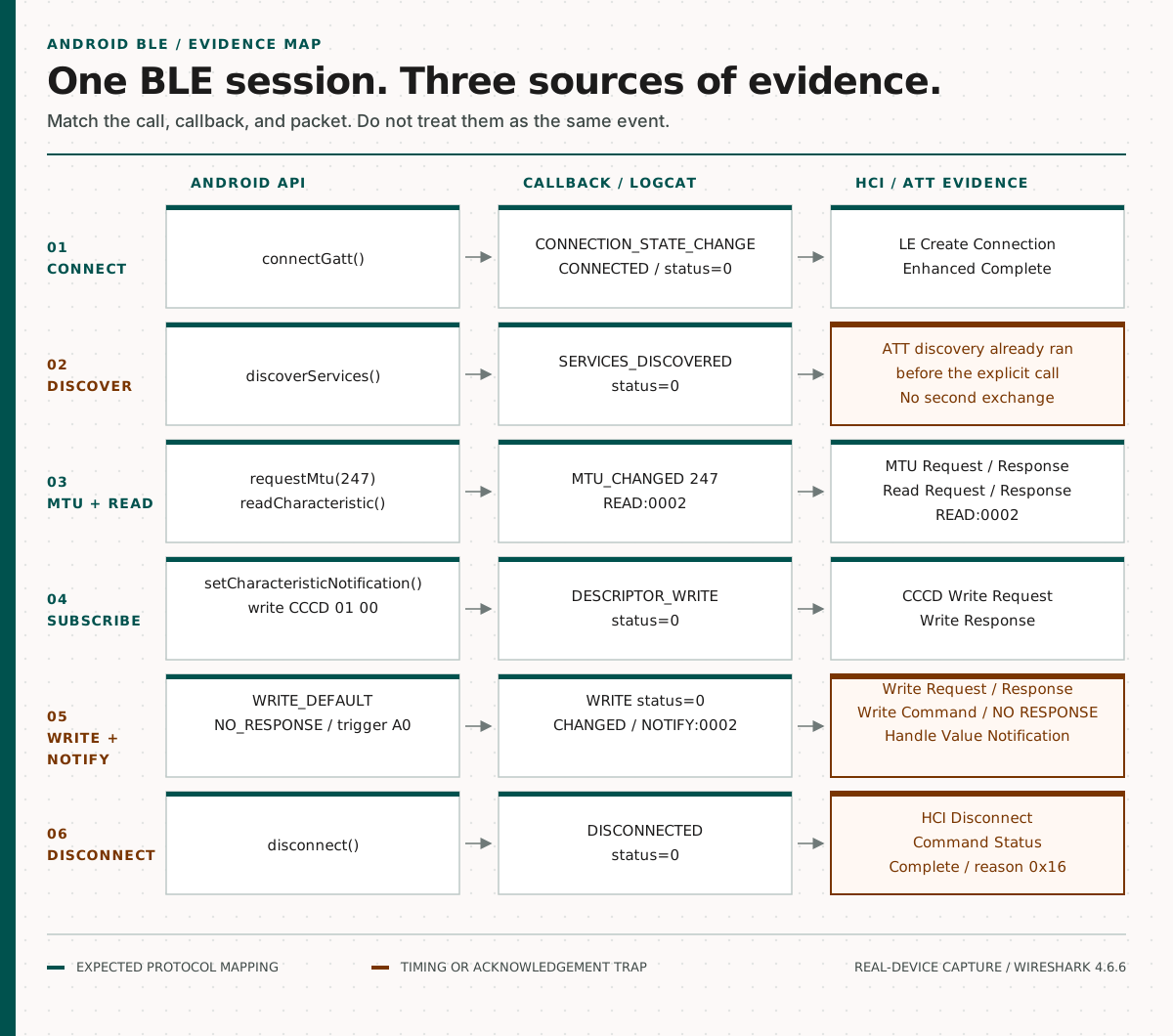
One BLE session shown across Android API calls, callbacks, and HCI or ATT packets.
This is a continuation of Why Your BLE Protocol Is Not a Secret, which explains how Android HCI snoop logs expose BLE behavior and how to export one from a bug report. Here, we start with the capture already open in Wireshark.
1. One BLE Session, Three Views
The lab is deliberately small:
- a real Android device running the diagnostic app;
- a native Android diagnostic app using
BluetoothGatt; - an ESP32-C3 advertising as
BLE-ATT-LAB; - Wireshark 4.6.6 reading the Android Bluetooth HCI snoop log.
The Android app has one button per operation. It does not automatically run a complete BLE workflow. That gives each API call a stable operation ID and a short pause before the next action:
connect -> discover -> request MTU -> read -> subscribe
        -> write with response -> write without response
        -> trigger -> notification -> disconnect
The ESP32 is not the subject of the investigation. It is only a deterministic peripheral with one custom service and three characteristics:
| Characteristic | Properties | Test behavior |
|---|---|---|
| Read | Read | Returns READ:0001, READ:0002, … |
| Command | Write, Write Without Response | Accepts both Android write types |
| Event | Notify | Sends NOTIFY:0001, NOTIFY:0002, … |
Writing the byte a0 to the Command characteristic triggers one notification.
There are no periodic events, so every important packet can be tied to an
explicit Android action.
In this captured connection, Wireshark decoded the following attribute handles:
| Attribute | Handle |
|---|---|
| Read value | 0x002a |
| Command value | 0x002c |
| Event value | 0x002e |
| Event CCCD | 0x002f |
These handles are capture evidence, not Android application constants. Android code should use discovered services, characteristics, and UUIDs rather than hard-coding handles that may change with the peripheral’s GATT database.
The capture contains 103 HCI packets. The filtered view shown here displays 51 of them (49.5%), covering discovery, MTU exchange, read, subscription, two write variants, notification, and disconnection.
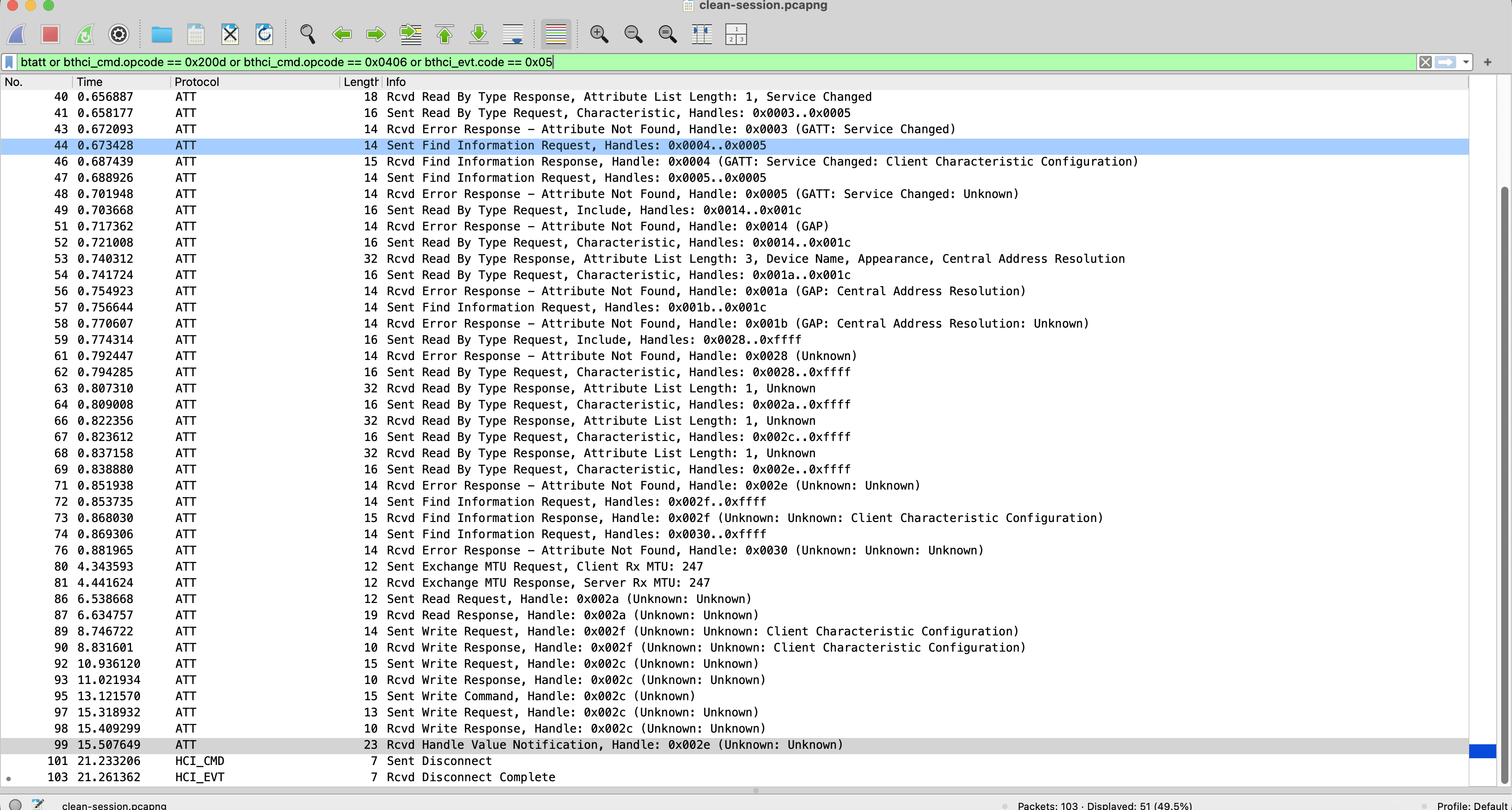
The screenshots use relative capture time. BTSnoop decoded roughly three hours ahead of Logcat, and the two logging pipelines do not share a monotonic clock. We correlated them using operation order, direction, handle, and payload. Relative timing is useful within each stream; displayed wall-clock timestamps alone are not used to decide whether a callback preceded a packet.
2. connectGatt(): Request First, Connection Later
The connection code is asynchronous:
bluetoothGatt = device.connectGatt(
    appContext,
    false,
    gattCallback,
    BluetoothDevice.TRANSPORT_LE,
)

override fun onConnectionStateChange(
    gatt: BluetoothGatt,
    status: Int,
    newState: Int,
) {
    val stateName = when (newState) {
        BluetoothProfile.STATE_CONNECTED -> "CONNECTED"
        BluetoothProfile.STATE_DISCONNECTED -> "DISCONNECTED"
        else -> newState.toString()
    }
    trace(
        "02",
        "callback=CONNECTION_STATE_CHANGE status=$status newState=$stateName",
    )
}
The sanitized Logcat timeline is:
13:57:16.545  op=02 action=CONNECT autoConnect=false transport=LE
13:57:16.945  op=02 callback=CONNECTION_STATE_CHANGE status=0 newState=CONNECTED
Wireshark shows three controller-level steps:
- frame 1 — HCI LE Create Connection;
- frame 2 — Command Status for LE Create Connection;
- frame 3 — LE Enhanced Connection Complete, status
0x00.
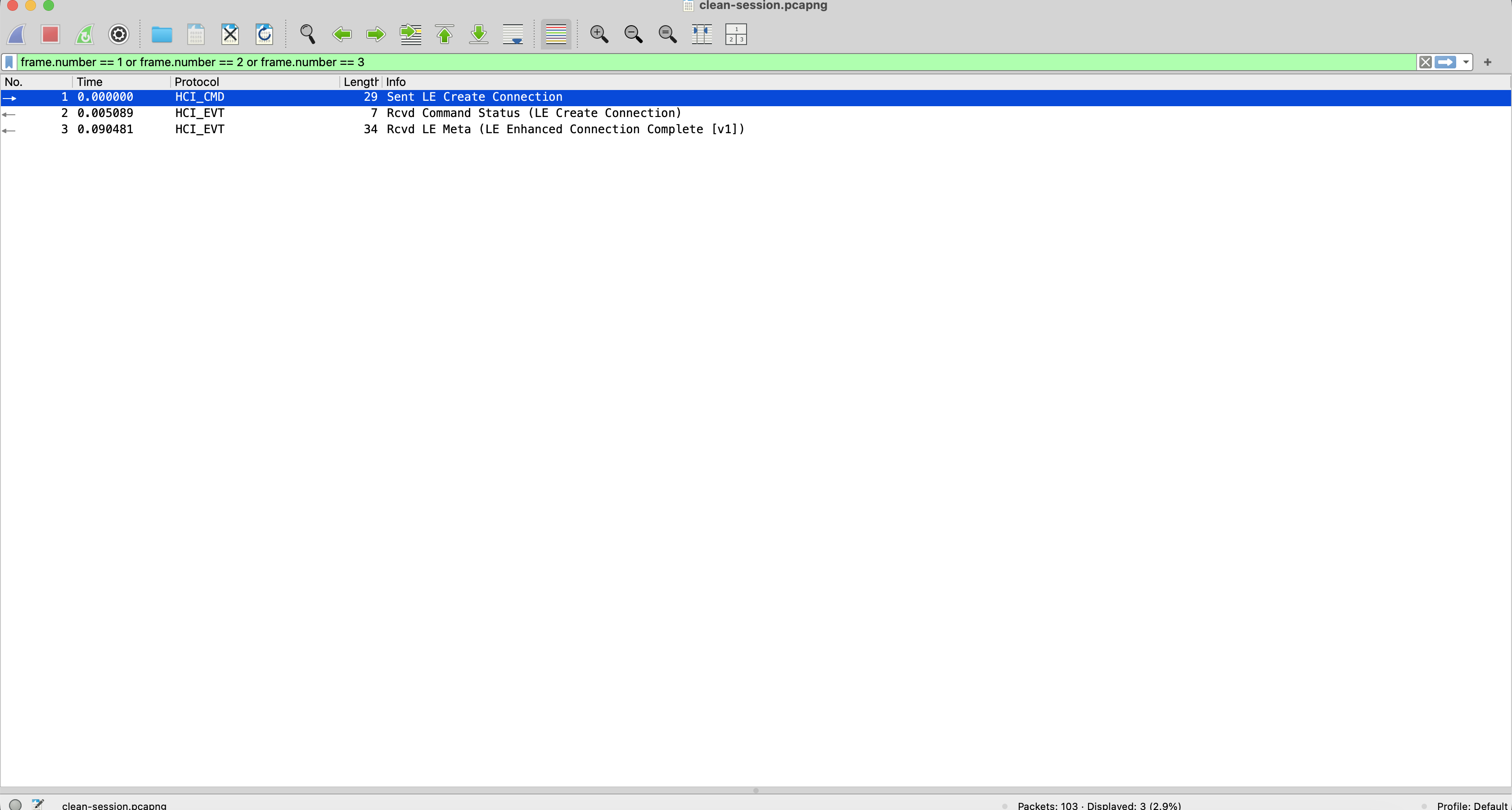
The important distinction is simple: returning a non-null BluetoothGatt
object does not mean that the link has already been established. The later
callback reports Android’s connection state, while the HCI events show the
controller procedure.
When a connection fails, compare the call, the callback status, and the HCI completion event instead of treating any one of them as the complete result.
3. discoverServices(): The First Surprise
The Android call looks exactly as expected:
val queued = gatt.discoverServices()
trace("03", "action=DISCOVER_SERVICES queued=$queued")

override fun onServicesDiscovered(gatt: BluetoothGatt, status: Int) {
    val service = gatt.getService(SERVICE_UUID)
    trace(
        "03",
        "callback=SERVICES_DISCOVERED status=$status " +
            "serviceFound=${service != null} serviceCount=${gatt.services.size}",
    )
}
The callback was almost immediate:
13:57:18.771  op=03 action=DISCOVER_SERVICES queued=true
13:57:18.773  op=03 callback=SERVICES_DISCOVERED status=0 serviceFound=true characteristicsReady=true serviceCount=3
If we only looked near that callback timestamp, we might conclude that service discovery produced no traffic.
But the ATT discovery sequence is clearly present earlier in the connection, in frames 30–76:
- Read By Group Type requests and responses find primary services;
- Read By Type exchanges find characteristic declarations;
- Find Information exchanges find descriptors, including the CCCD at handle
0x002f.
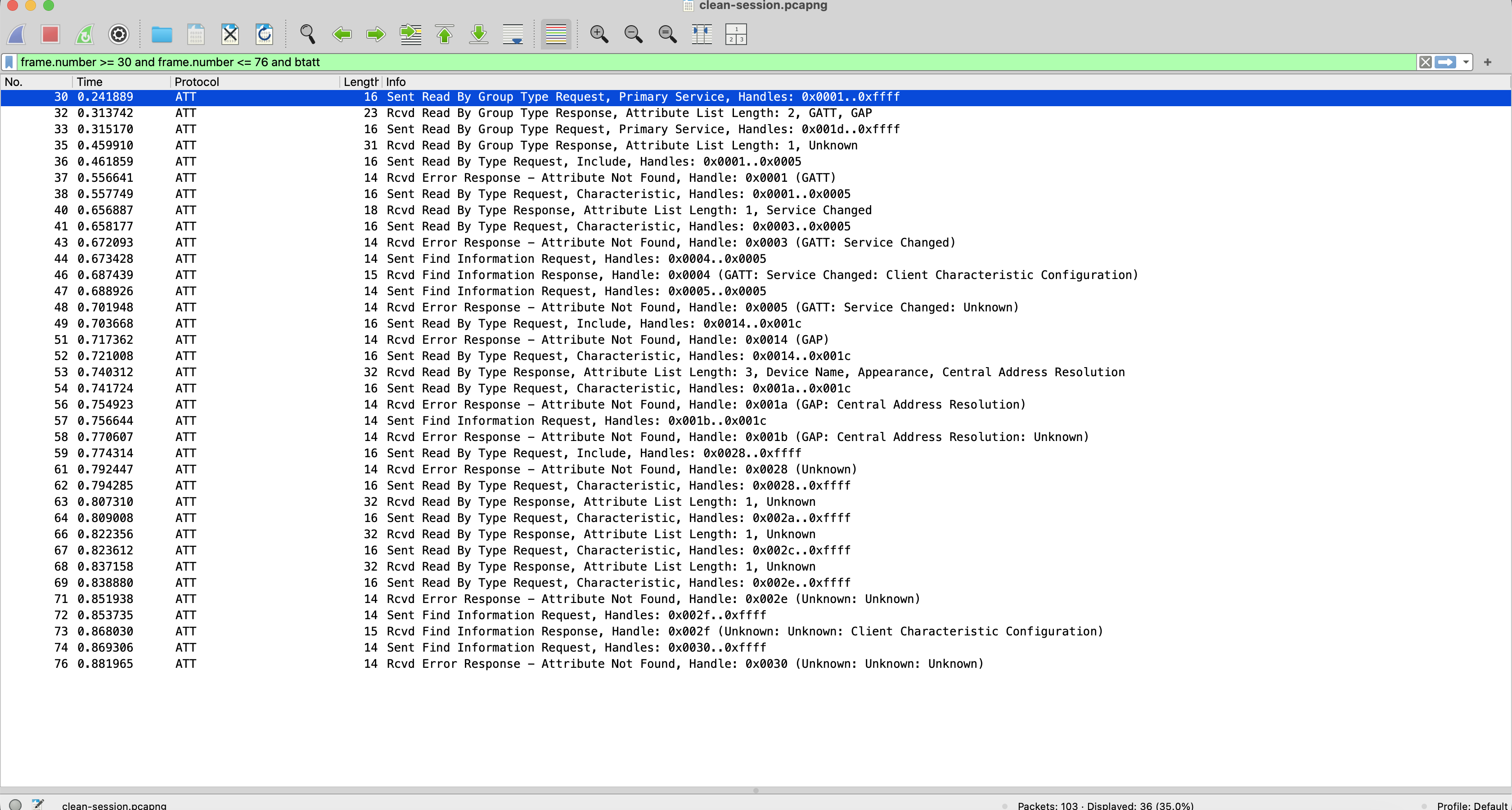
The unexpected part is timing. In this run, ATT discovery started immediately
after connection and finished before the user pressed the Discover button. The
later discoverServices() call produced a successful callback without a second
ATT discovery exchange.
Android documents discoverServices() as asynchronous and reports completion
through onServicesDiscovered(). The capture proves that the ATT exchange and
callback were not adjacent; it does not reveal why Android started discovery
early or whether cached state influenced the behavior. See the official
BluetoothGatt API reference.
Do not generalize this capture into a rule that Android always discovers services automatically. The useful lesson is narrower:
A successful
onServicesDiscovered()callback does not prove that a new ATT discovery exchange occurred at the callback timestamp.
When packets are missing near a callback, search the full connection before concluding that Wireshark failed to capture them.
4. requestMtu(247): A Clean Request and Response
MTU negotiation gives us the clearest one-to-one mapping in the session:
val queued = gatt.requestMtu(247)

override fun onMtuChanged(gatt: BluetoothGatt, mtu: Int, status: Int) {
    trace("04", "callback=MTU_CHANGED status=$status mtu=$mtu")
}
13:57:20.973 op=04 action=REQUEST_MTU requested=247 queued=true
13:57:21.076 op=04 callback=MTU_CHANGED status=0 mtu=247Wireshark shows:
- frame 80 — ATT Exchange MTU Request, Client Rx MTU 247;
- frame 81 — ATT Exchange MTU Response, Server Rx MTU 247.
Starting with Android 14, the first GATT client to call requestMtu() causes
the Android stack to request an ATT MTU of 517, regardless of the value passed
by the app. Subsequent MTU requests on the same ACL connection are ignored. The
247-byte request shown here is therefore specific to this captured environment.
The negotiated ATT MTU controls how much ATT data fits in one protocol data unit. It does not change the meaning of the application payload.
MTU behavior can differ across Android releases and when multiple GATT clients are involved. In this session, the request and response both contain 247. The capture—not the API argument alone—is the ground truth for the tested device.
5. readCharacteristic(): Correlate by Handle and Payload
The app reads the characteristic discovered by UUID:
val queued = gatt.readCharacteristic(readCharacteristic)

override fun onCharacteristicRead(
    gatt: BluetoothGatt,
    characteristic: BluetoothGattCharacteristic,
    value: ByteArray,
    status: Int,
) {
    trace(
        "05",
        "callback=CHARACTERISTIC_READ status=$status value=${value.decodeToString()}",
    )
}
Android reports:
13:57:23.170  op=05 action=READ_CHARACTERISTIC uuid=...def1 queued=true
13:57:23.272  op=05 callback=CHARACTERISTIC_READ status=0 value=READ:0002
The corresponding packets are:
- frame 86 — ATT Read Request to handle
0x002a; - frame 87 — ATT Read Response from handle
0x002a.
The response bytes are:
52 45 41 44 3a 30 30 30 32
 R  E  A  D  :  0  0  0  2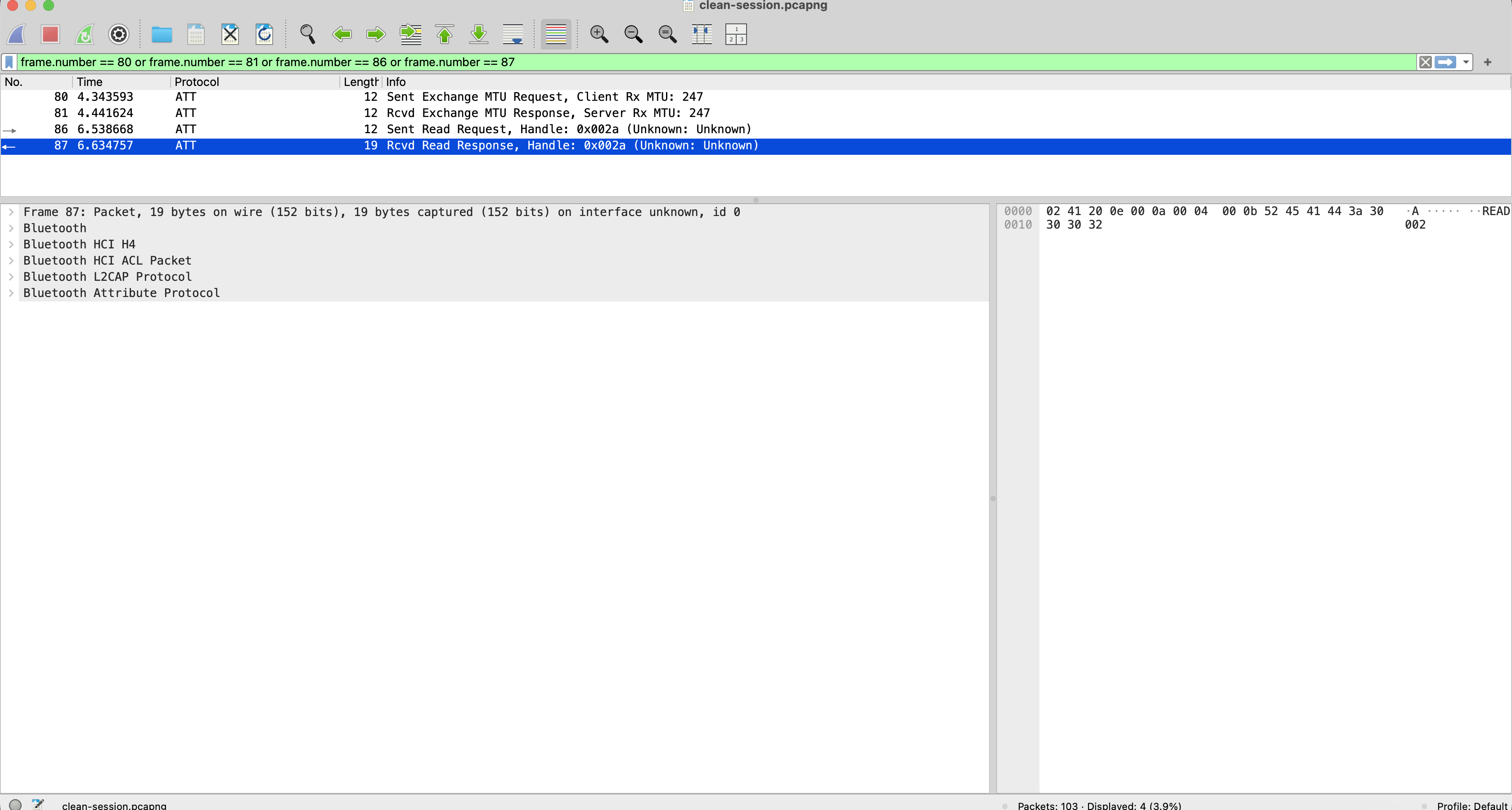
Timestamps are only the first correlation clue. Direction, handle, opcode, and payload make this mapping much stronger.
6. Enabling Notifications Is Two Operations
Android notification setup is often reduced to one line in examples, but the working flow has two separate responsibilities:
val localEnabled =
    gatt.setCharacteristicNotification(eventCharacteristic, true)

val result = gatt.writeDescriptor(
    cccd,
    byteArrayOf(0x01, 0x00),
)
The first call configures notification handling on the Android side. The second
call writes 01 00 to the remote Client Characteristic Configuration
Descriptor, enabling notifications on the peripheral.
Our Logcat sequence makes both actions visible:
13:57:25.374  op=06 action=SET_CHARACTERISTIC_NOTIFICATION enabled=true result=true
13:57:25.376  op=06 action=WRITE_CCCD value=0100 result=0
13:57:25.464  op=06 callback=DESCRIPTOR_WRITE status=0 notificationsEnabled=true
Only the remote descriptor write appears as ATT traffic:
- frame 89 — ATT Write Request to CCCD handle
0x002f, value01 00; - frame 90 — ATT Write Response.
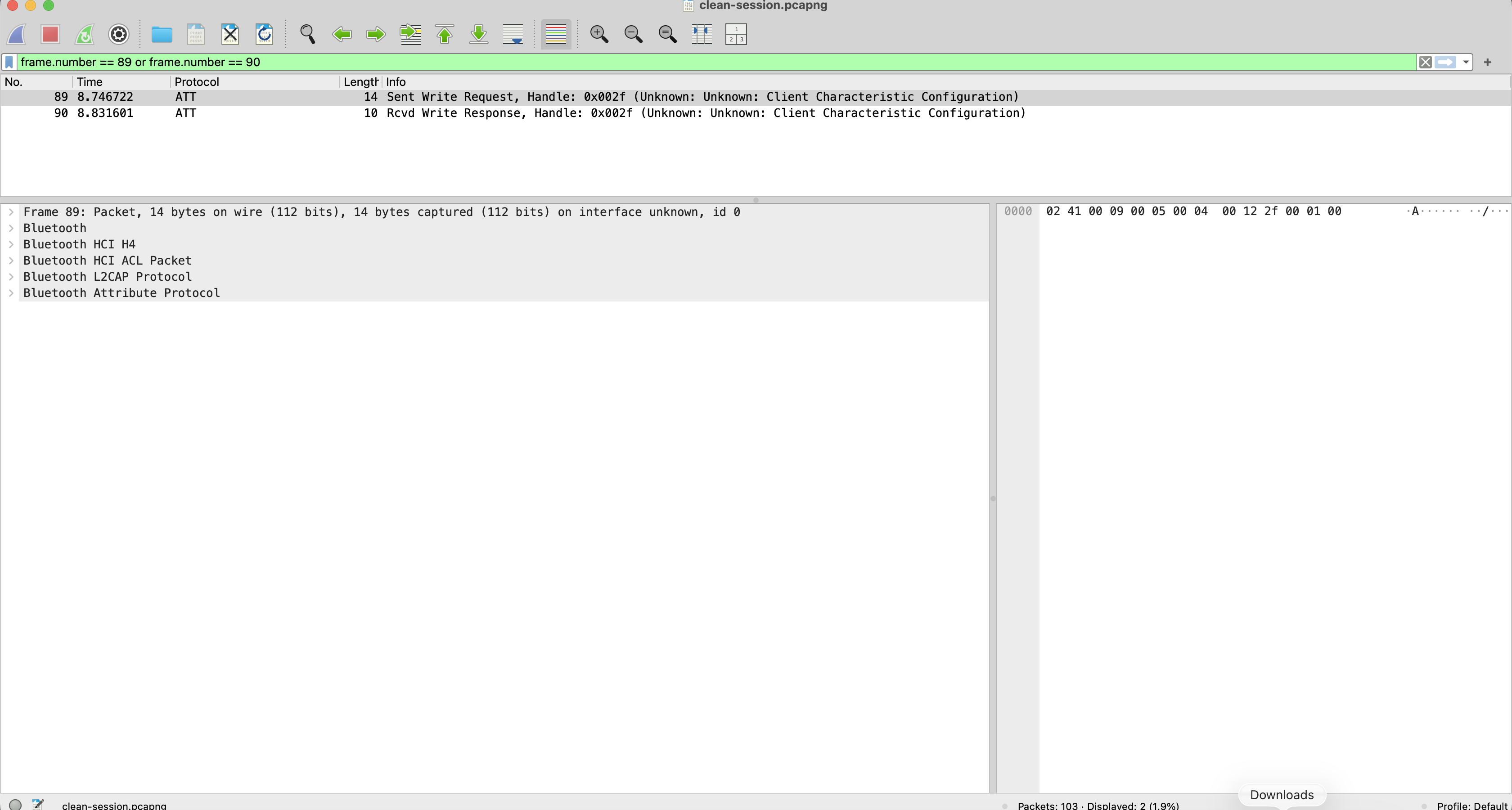
This is why setCharacteristicNotification(..., true) returning true is not
enough to prove that the peripheral subscription succeeded. It tells you that
Android accepted the local configuration step. The descriptor callback and
ATT Write Response belong to the remote CCCD write.
7. Write Request vs Write Command
Now we send two recognizable payloads to the same characteristic:
gatt.writeCharacteristic(
    commandCharacteristic,
    byteArrayOf(0x01, 0x02, 0x03),
    BluetoothGattCharacteristic.WRITE_TYPE_DEFAULT,
)

gatt.writeCharacteristic(
    commandCharacteristic,
    byteArrayOf(0x04, 0x05, 0x06),
    BluetoothGattCharacteristic.WRITE_TYPE_NO_RESPONSE,
)
Android’s
BluetoothGattCharacteristic documentation
describes WRITE_TYPE_DEFAULT as requesting acknowledgement by the remote
device and WRITE_TYPE_NO_RESPONSE as not requiring a response.
Write with response
13:57:27.566  op=07 action=WRITE_REQUEST value=010203 result=0
13:57:27.655  op=07 callback=CHARACTERISTIC_WRITE status=0
Wireshark shows:
- frame 92 — ATT Write Request, handle
0x002c, value01 02 03; - frame 93 — ATT Write Response.
The response completes the ATT write procedure. It still does not necessarily mean that a motor moved, a lock opened, or a firmware update finished. Those are application-level outcomes and may need a separate protocol response.
Write without response
13:57:29.751  op=08 action=WRITE_COMMAND value=040506 result=0
13:57:29.753  op=08 callback=CHARACTERISTIC_WRITE status=0
Wireshark shows only:
- frame 95 — ATT Write Command, handle
0x002c, value04 05 06.
There is no ATT response after it.
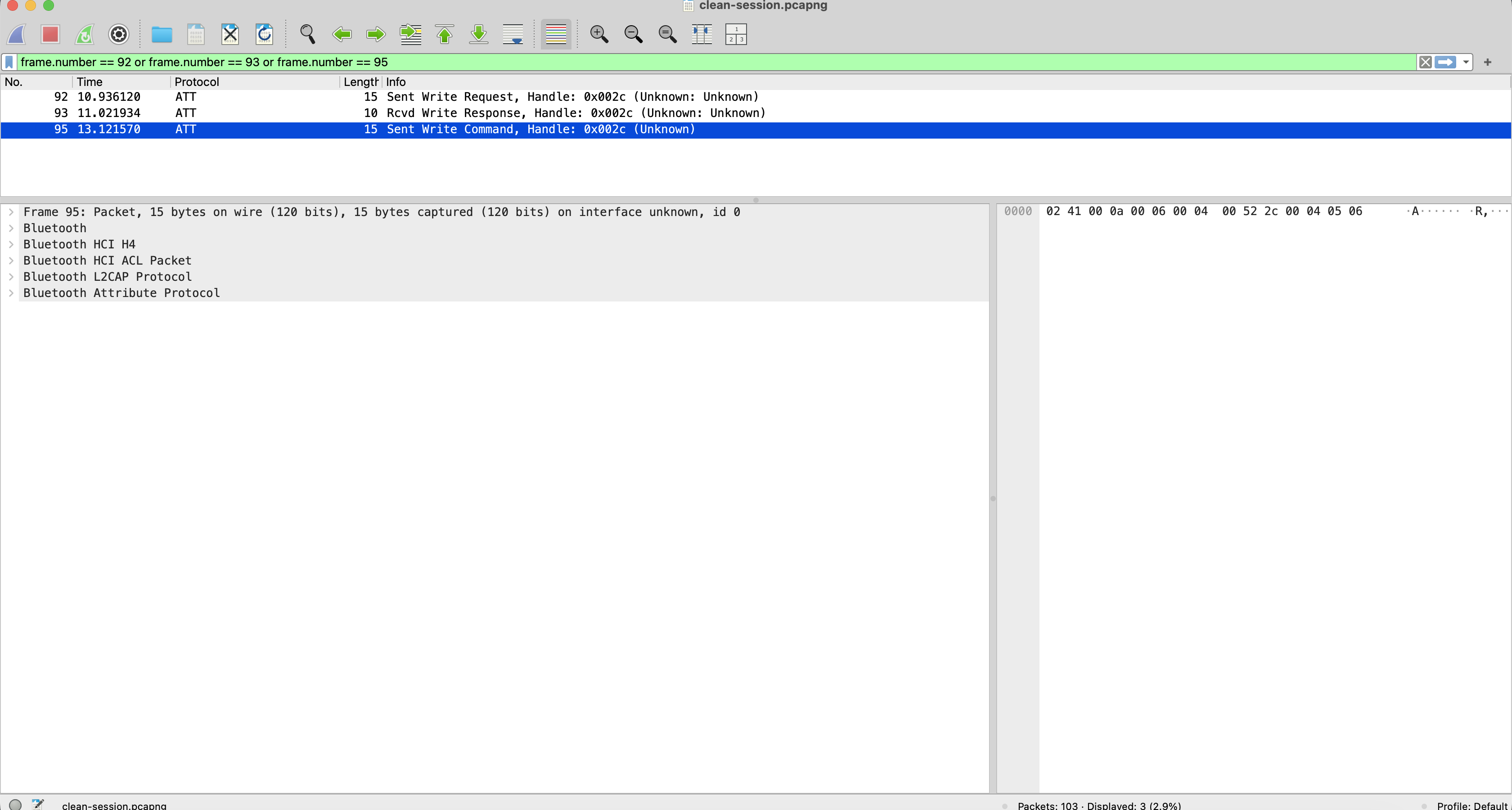
The Bluetooth Core Specification is unambiguous: no ATT Error Response or ATT Write Response is sent for an ATT Write Command. If the server cannot write the attribute, the command may simply be ignored.
That makes the Android callback easy to over-interpret. In this captured
session, onCharacteristicWrite(status=0) arrived about 2 ms after the API call
even though there was no remote ATT acknowledgement to wait for.
The safe conclusion is:
For
WRITE_TYPE_NO_RESPONSE, a successful Android callback is evidence of local stack completion—not proof that the peripheral received, processed, or accepted the command.
If the product needs confirmation, define an application-level response, such as a notification containing a transaction ID and result.
8. A Write Triggers a Notification
The final application interaction uses that pattern. Android sends one-byte
command a0 with response, and the ESP32 later emits a notification:
gatt.writeCharacteristic(
    commandCharacteristic,
    byteArrayOf(0xA0.toByte()),
    BluetoothGattCharacteristic.WRITE_TYPE_DEFAULT,
)

override fun onCharacteristicChanged(
    gatt: BluetoothGatt,
    characteristic: BluetoothGattCharacteristic,
    value: ByteArray,
) {
    trace("09", "callback=CHARACTERISTIC_CHANGED value=${value.decodeToString()}")
}
The Android timeline is:
13:57:31.949  op=09 action=TRIGGER_NOTIFICATION value=A0 result=0
13:57:32.049  op=09 callback=CHARACTERISTIC_WRITE status=0
13:57:32.143  op=09 callback=CHARACTERISTIC_CHANGED value=NOTIFY:0002
Wireshark separates the procedures clearly:
- frame 97 — ATT Write Request
a0to handle0x002c; - frame 98 — ATT Write Response;
- frame 99 — ATT Handle Value Notification from handle
0x002e, valueNOTIFY:0002.
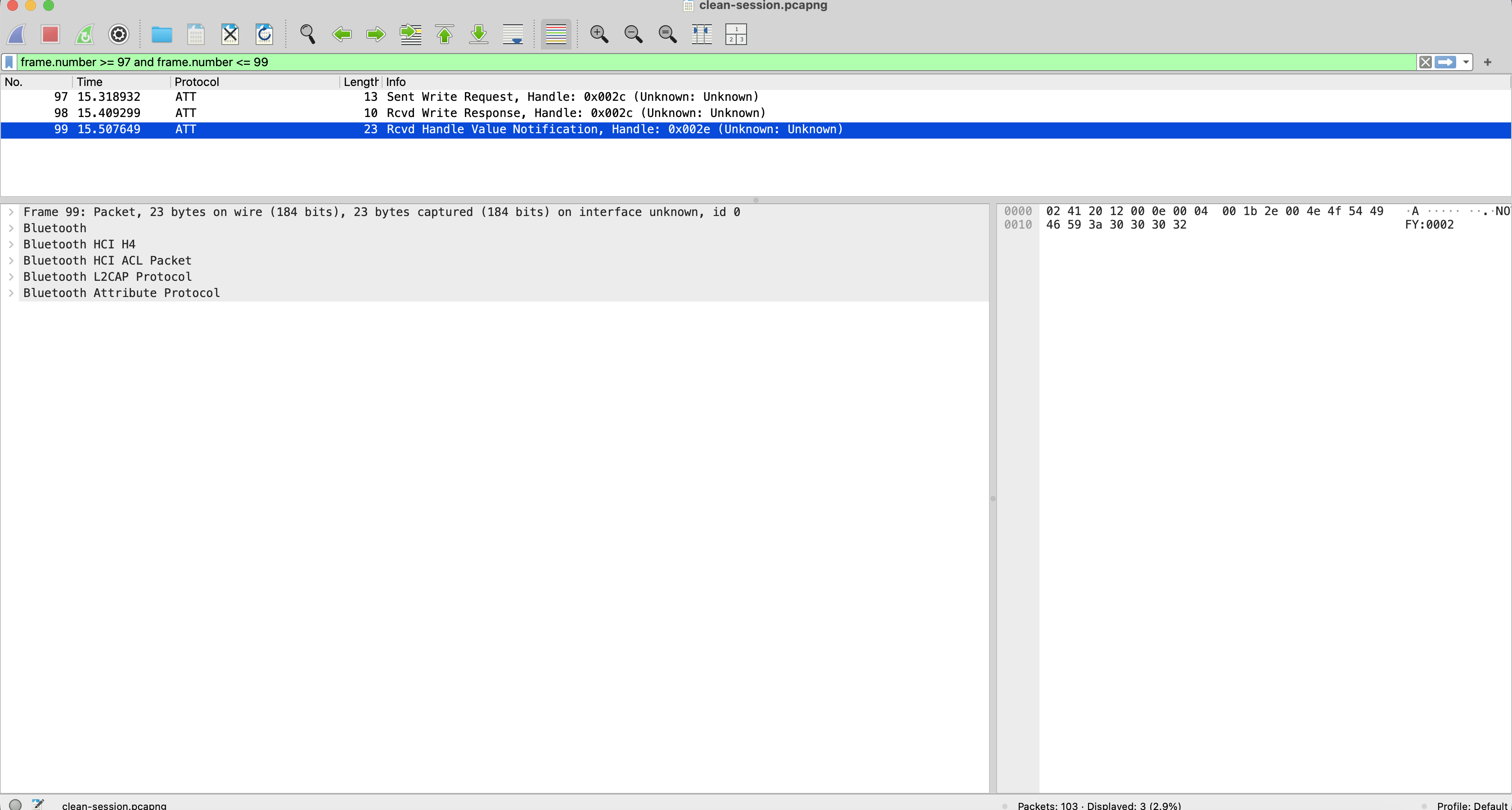
The Write Response confirms the ATT write procedure. The later Handle Value
Notification is a separate server-initiated ATT message and maps to
onCharacteristicChanged().
Notifications and indications are not the same. A notification does not have an ATT confirmation. An indication requires a Handle Value Confirmation from the client. The Bluetooth ATT specification defines those as separate procedures.
9. disconnect(): Leave ATT and Look at HCI
The last Android action is simple:
trace("10", "action=DISCONNECT")
gatt.disconnect()
13:57:36.856 op=10 action=DISCONNECT
13:57:36.867 op=10 callback=CONNECTION_STATE_CHANGE status=0 newState=DISCONNECTEDThere is no ATT Disconnect packet. Link termination belongs to HCI and the lower layers:
- frame 101 — HCI Disconnect;
- frame 102 — Command Status for Disconnect;
- frame 103 — Disconnect Complete, status
0x00, reason0x16.
Wireshark decodes reason 0x16 as Connection Terminated by Local Host, which
matches the app-initiated disconnect.
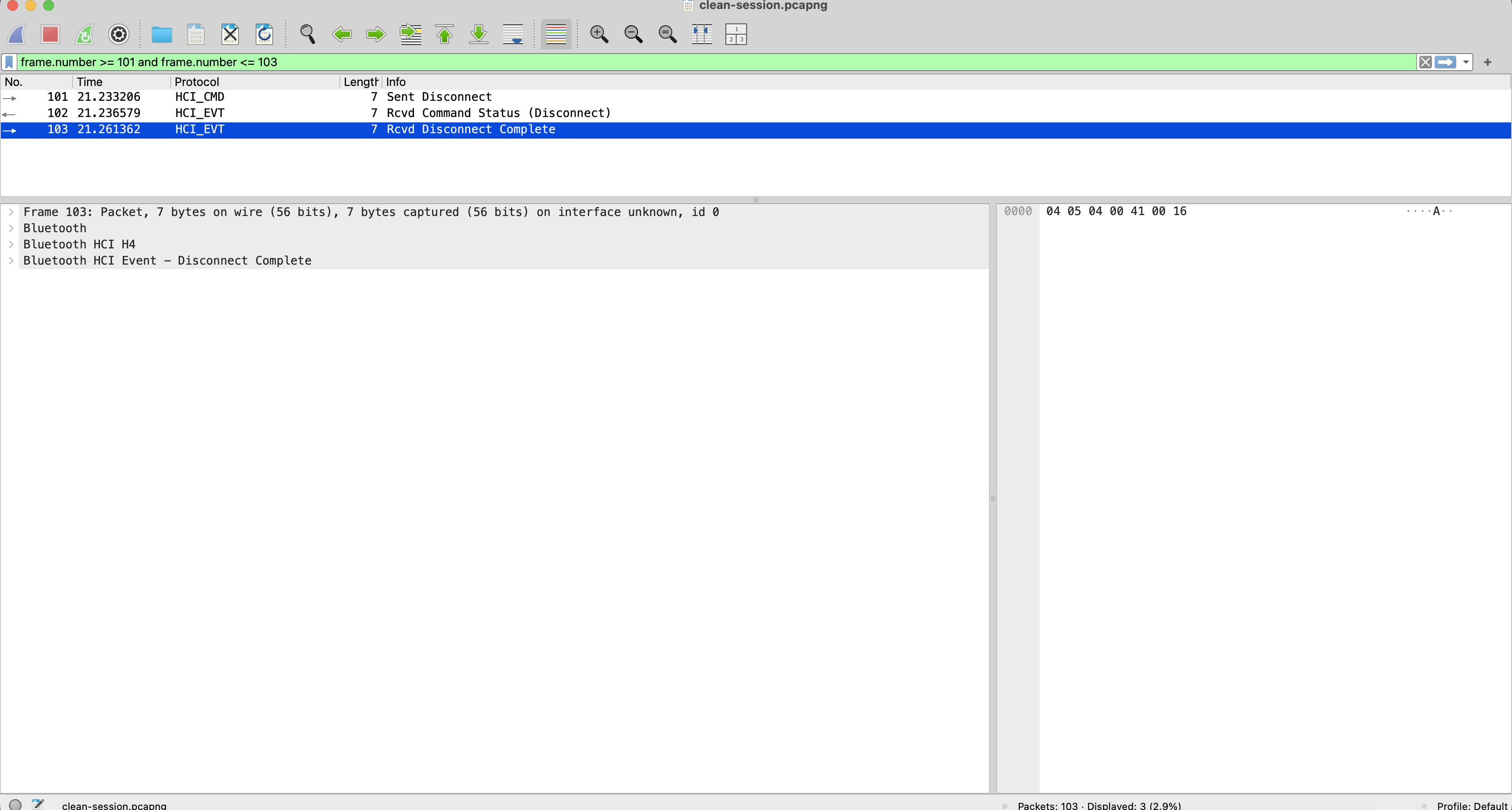
The Logcat and BTSnoop timestamps appear to put the callback before the HCI
command. Because they come from independent logging pipelines, that comparison
alone does not prove the ordering. What the evidence does prove is that
disconnect() maps to Android connection state and an HCI termination
sequence—not to an ATT packet.
10. How to Repeat This with Your Own BLE App
You do not need this exact peripheral to use the same method.
Make the trace easy to correlate
Give every operation a stable ID and log both the call and callback:
op=07 action=WRITE_REQUEST value=010203
op=07 callback=CHARACTERISTIC_WRITE status=0
Then make the packet side equally recognizable:
- use payloads such as
01 02 03,04 05 06, or short ASCII strings; - run one asynchronous GATT operation at a time;
- match direction, ATT or HCI operation, handle, and payload before relying on timestamps;
- search the full connection when a callback has no adjacent packet.
The discovery exchange in this session is the warning: the packets were real, but they did not occur next to the explicit API call.
Define what “success” means
Keep these outcomes separate:
| Evidence | What it can support |
|---|---|
| Android API accepted the request | The operation was queued locally |
| Android callback status is success | Android reported operation-specific completion; inspect the matching procedure |
| ATT Write Response | The request/response write procedure completed |
| Application notification or response | The device protocol reported a result |
| Observed physical behavior | The product action actually occurred |
Not every workflow needs every level. But a critical command should not treat local queueing as proof of physical completion.
11. What an Android HCI Log Can and Cannot Prove
An Android HCI snoop log observes the host/controller boundary. It can show:
- connection commands and events;
- ATT discovery procedures;
- reads and responses;
- descriptor and characteristic writes;
- notifications;
- link termination and reason codes.
It is not an external over-the-air capture. An outbound Write Command shows that the host handed data to the controller; with no protocol response, it does not prove RF delivery or peripheral processing.
Nor does the capture explain application semantics. Wireshark shows that a0
was written and NOTIFY:0002 arrived; the device protocol defines what those
bytes mean.
Everything above is a read-and-subscribe session. Firmware transfer changes the failure modes entirely — chunking, flow control, resumability, and a device that must stay bootable if the link dies mid-image. See BLE OTA firmware updates for that architecture.
How MaboaSoft Helps
MaboaSoft builds and reviews mobile software for connected products. We help teams turn BLE behavior into evidence that Android, firmware, hardware, QA, and security engineers can use together.
Typical work includes:
- mapping Android and iOS BLE code to real GATT traffic;
- reviewing connection, discovery, subscription, and retry state machines;
- diagnosing vendor- and Android-version-specific behavior;
- separating transport acknowledgement from device-level command results;
- preparing reproducible HCI captures and engineering handoff documentation.
If a BLE integration works in the happy path but becomes difficult to explain when it fails, the first step is usually to make the app, callbacks, and packets tell the same story.
Building or debugging an Android app for a BLE product? Book a 20-minute call. We will help you map the mobile flow, identify what each layer actually proves, and prepare evidence the device and firmware teams can act on.
We build BLE companion apps — IoT & BLE companion apps.
FAQ
Does onCharacteristicWrite(status=0) prove that the BLE device received the
value? Not for WRITE_TYPE_NO_RESPONSE: ATT sends no response, so the Android
callback cannot prove remote receipt or processing. Use an application-level
response when that confirmation matters.
Why can discoverServices() succeed without nearby discovery packets?
In this run, ATT discovery occurred before the explicit call. The capture does
not identify why Android started it early, so search the full connection before
assuming the packets are missing or declaring a cache hit.
Is setCharacteristicNotification() enough to subscribe? Usually no. It
configures Android-side handling; the client must also write the peripheral’s
CCCD and check the descriptor-write result.
Why do I not see an ATT packet for disconnect()? Disconnect is link
management, not an ATT procedure. Inspect HCI Disconnect, Command Status, and
Disconnect Complete events.
Are GATT handles stable? Do not assume so. Handles identify attributes in the server’s current GATT database and may change when firmware changes the database. Android code should use discovered UUIDs and characteristics.
Resources & Further Reading
- Android
BluetoothGattAPI reference - Android
BluetoothGattCallbackAPI reference - Android
BluetoothGattCharacteristicAPI reference - Bluetooth Core Specification: Attribute Protocol
- Wireshark Bluetooth protocol family
Final Thoughts
The useful BLE debugging question is not:
Did my Android method return success?
It is:
What evidence exists at each layer, and what does that evidence actually prove?
In one short session, we saw three reasons to ask that question carefully:
- service-discovery packets occurred before the explicit Android call;
- a Write Command produced an Android callback but no ATT response;
disconnect()produced HCI termination evidence rather than an ATT packet, while the two timestamp sources could not prove exact cross-layer ordering.
None of those observations make Android or BLE incorrect. They show why an Android callback is not a packet, and a packet is not a product result.
Once those layers are separated, Wireshark stops being a wall of Bluetooth packets. It becomes a precise way to verify what the Android BLE stack actually sent and received.
The next article will use the same lab to break each stage deliberately and diagnose connection, discovery, write, subscription, and notification failures from HCI logs.